
Built for AV integrators and cinema designers
Design the room,
prove the sound,
issue the drawings.
Design your cinema in one place. Plan the room, refine the sound and create drawings your installers can build from. All in your browser.

The plan view
The plan view,
cut down to size.
This is Room Setup's own plan view with almost everything stripped out. The fabric, the speaker presets, the dispersion modelling, the elevations and the drawing set all live in the real one. What is left is the part that shows you how the tool thinks: the speakers hold their channel angles against the listening position, and every number on the drawing is recalculated the moment something moves.
- Drag the listening position. It stays on the centre line — that is the axis every channel angle is measured from — and both rows travel with it.
- Drag a row. The back row slides along the riser, and its viewing angle follows.
- Drag a speaker. Sliding it along the wall is really a change of angle from the listener, which is exactly what it is in the tool.
- Switch the format. 5.1, 7.1.4 or 9.1.6 — the wides and the height layer come and go with it.

One room model, every tool
Six tools that share
one room.
Room geometry lives in one canonical model and is handed between tools. Trace a floor plan in Room Creator, lay the room out in Room Setup, drop a ceiling frame in from Space Frame, then issue the set from Output — without redrawing anything.
Room Setup
The whole room in one canvas: geometry and fabric, speakers and subs, dispersion coverage, seating and sightlines, plan and elevation views, spec sheet and GLB export.
Where most of the work happensRoom Creator
Turn what the architect sent you into a model. Trace a PDF or image floor plan, auto-detect walls and openings, set scale from a known dimension — or import a GLB and label the meshes.
Screen Setup
Screen size, aspect and masking, projector throw and placement — worked out before there is a room to put it in, then carried across when there is.
Space Frame
Acoustic ceiling frames and clouds: structure calculation, batten schedule against stock lengths, placement, and a GLB that drops straight back into the room.
Wall Designer
Design the panel layout for a wall on its own, then link that project into Room Setup — the finished wall appears in the room and in every elevation drawn from it.
Output
Drawings and schedules issued from a saved room, through a document-issue review step — so nothing reaches site without someone signing it off.
Why the Room Setup tool earns its keep
One model.
Not five
drawings that
disagree.
Move a seat and the sightlines, the dispersion cones and the elevation move with it. That is the whole point: the thing you present to the client and the thing you hand to the installer are the same file.
Geometry that matches the site
Doors and windows with swings, floor plinths and steps, wall box-outs and columns, skirting and cornice, coffered ceilings and a space-frame ceiling imported from the frame tool. The model is the room you were given, not a rectangle you wish you had.
Speakers you can defend in a meeting
Real brand and model presets with true cabinet dimensions, per-channel aim and tilt, mounting and exclusion zones, subwoofer placement — and dispersion drawn as beam and SPL so you can show why the surround sits where it sits. Stereo, soundbar, LCR, surround and immersive layouts up to 9.1.6.
Seating that drives the geometry
Rows and tiers, seat and row spacing, seated ear height, recline and lift. Put the back row on a riser and it lifts with it. Snap row one to the main listening position and the distances and angles recalculate — including MLP distance and off-axis angle from the cabinet position.
Acoustics checked in the same place
Room modes from the finished dimensions, with speed of sound and the frequencies you care about shown against the layout — so the mode problem shows up while the walls are still drawings.
Output the installer trusts
Plan, front, rear, left, right and 3D views from the same model, a split view for two at once, transparent PNG or solid JPEG for the proposal, an offline spec-sheet PDF, and GLB for whoever needs the geometry next.
Seven views of one truth
Plan it, then look
at it from the seat.
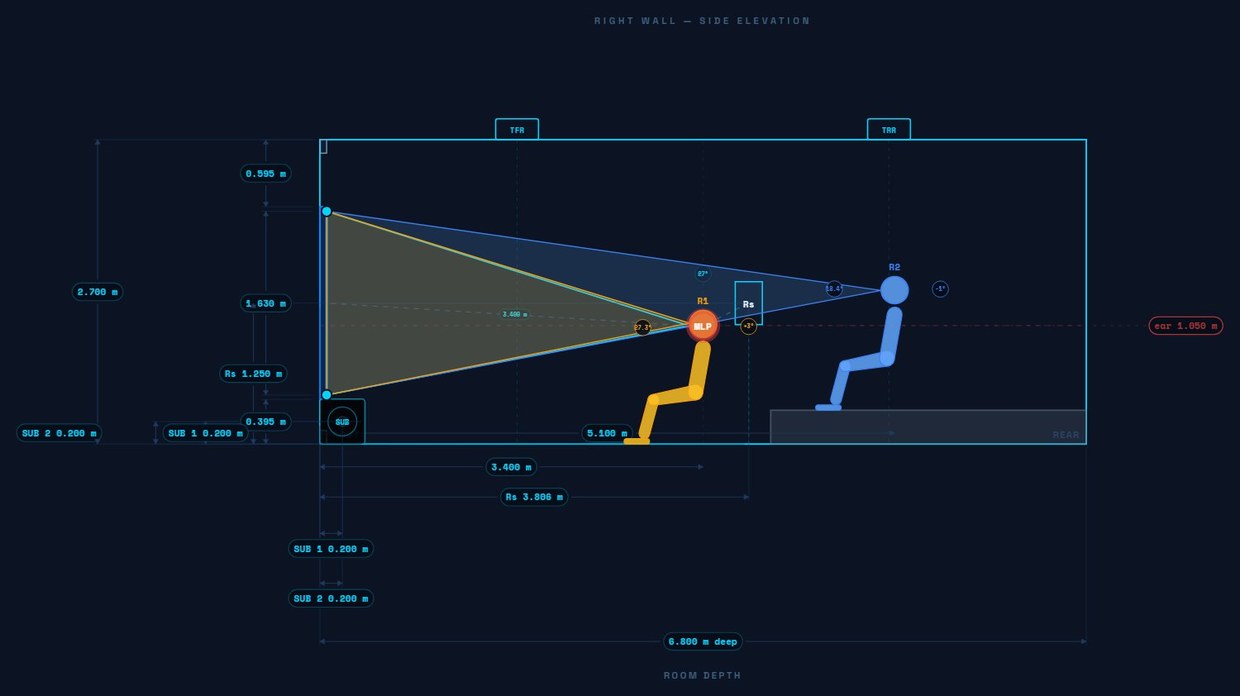
Every view is generated from the same room, so an elevation can never drift from the plan. Open two at once in split view when you are checking a mount height against the sightline.
Built for a studio, not a laptop
Two designers, one room,
at the same time.
Work the room together
Invite a colleague into a live session on the same project, or add a standing collaborator who can open your rooms whenever they need to. Invitations land in the hub, accept or decline in a click.
Seats, not shared logins
Buy the seats you need, invite by email, revoke when someone leaves. Two-factor and passkeys are built in, and an account can only hold one live session at a time.
Your kit, saved once
Save speaker presets to your account and reuse them on every job. Shared folders keep GLB models, brand assets and reference files where the whole team can reach them.
Your next room starts here
Get an account.
Create your account, verify your email, and we’ll help you get set up with the tools you need.
Already have an account? Sign in